|

Oracle Dba For freshers
Friday, 23 June 2017
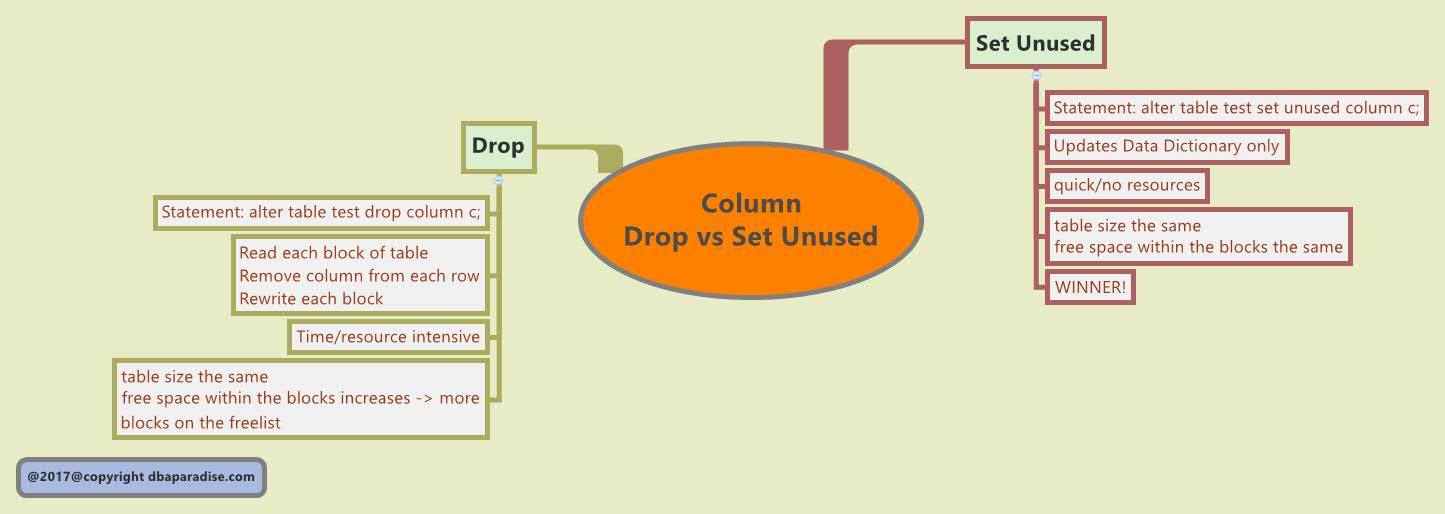
To Drop Or Not To Drop A Column – Find Out The Answer


Thursday, 14 July 2016
Oracle database installation capacity planning details
Capacity planning is an essentially important career profile that determines the resource demand in current, future. Personnel from infrastructure teams typically server engineers, DBA do take additional responsibility. Tools from popular vendors like CA BMC assists with capacity planning. This can be easily done using proper excel sheet with details on resources needed for the ongoing project, future project, growing trends etc. Now-a-days information is wealth. Bigdata in a way impacts capacity planning directly and indirectly as predictive trends in online space depends on data usage. This internally translates to capacity planning of the project. As a first step lets see what needs to be considered while planning installation of database. Oracle is a popular brand in use and lets take this exmaple
What is needed for installing an Oracle database?
Proper planning, good documentation, scheduling and appropriate execution is needed for proper installation of an oracle database.
What are the factors to be considered during planning of oracle database installation?
We need to make sure that we have adequate hardware resources, operating system resources, proper environment variable settings during planning oracle database installation
What are the environment variables to be set during oracle database installation?
ORACLE_HOME, ORACLE_BASE,ORACLE_SID,ORACLE_UNQNAME are some environment variables to be set during installation. These values should be obtained from system administration team beforehand and needs to be included in planning document
What is the first factor to be considered while planning an installation?
The first step is going to be capacity planning. This involves planning a database in accordance with availability of resources
What is needed for installing an Oracle database?
Proper planning, good documentation, scheduling and appropriate execution is needed for proper installation of an oracle database.
What are the factors to be considered during planning of oracle database installation?
We need to make sure that we have adequate hardware resources, operating system resources, proper environment variable settings during planning oracle database installation
What are the environment variables to be set during oracle database installation?
ORACLE_HOME, ORACLE_BASE,ORACLE_SID,ORACLE_UNQNAME are some environment variables to be set during installation. These values should be obtained from system administration team beforehand and needs to be included in planning document
What is the first factor to be considered while planning an installation?
The first step is going to be capacity planning. This involves planning a database in accordance with availability of resources
Tuesday, 12 July 2016
How to Prepare for DBA Interview
Preparation for DBA Interview
Nobody can give us complete or most of questions about interview because it is like our school, college exam which we don't know what exact questions comes in.
For school, college exam we need to go through every books which related to exams topic same like any Interview not for DBA only we need to prepare our self and go through each and every topic related to Oracle Database.
So now question is change from Oracle DBA interview question TO How to prepare myself for DBA interview?
And now , here , we explained how we can prepare our self for DBA interview.
1. First understand we are going for DBA interview means Database Administrator.
“A person who’s responsible to handle and maintain database called DBA”
Means DBA position is very Hard, though, sensitive and confidential.
We can divide Oracle DBA interview in Four Major part.
1. Oracle Database Administration
2. Oracle Database Backup & Recovery Administration
3. Oracle Database Performance Tuning
4. Oracle Database Advanced administration
ü Oracle Database Administration
1. How to install Oracle Database Software on Different platforms?
Above point include Oracle Database Server or Client installation on different flavor like LINUX/SORALIS/UNIX/WINDOWS etc. so whenever you are going for interview must go through each installation guide.
2. How to Create Database?
There is two option for create DATABASE.
DBCA or MANUALLY
3. How to create tablespace?
4. How to configure Oracle Client to connect to Oracle Server?
In Above point we need to create TNS_ENTRY for database client through NETCA tools.
5. Database User Management
Specific permission on database according user needs. User profile creation., role management, etc.
6. Database Security
In above point we need to do Database Auditing, User Logon, Logoff information.
ü Oracle Database Backup & Recovery Administration
Ø 1. What is your backup strategy for database backup?
It is depends on many factor.
1. Database size It is in MB, GB or TB
2. Database type It is OLTP or DSS
3. Database availability It is 24x7
So whenever we design backup strategy for database keeps in mind above points. Because Oracle Expert Mr. Tom kyte said “We can FIX everything except BAD DATABASE BACKUP”.
Ø 2. What is your backup method for database backup?
It is also depend on condition.
1. Backup Type COLD backup or HOT backup
2. Backup Method RMAN or USER MANAGED
3. Backup Interval Every Day, Every Week, Every Month.
Oracle Corp. recommended to use RMAN (server managed) backup method for database backup but we can also use USER MANAGED backup if applicable.
NOTE: Always RUN production database in ARCHIVELOG mode.
After set proper backup strategy now practice on database recovery because interviewer must ask question about recovery side.
“Database Recovery is depend on Database backup”
There are so many or different types of recovery so we can divide recovery area in following.
Ø How many types of recovery we can perform?
1. When datafile is lost
2. when controlfile is lost
3. when online redolog file is lost
Above three files is most important file for database if we lost them then we needed to perform recovery.
1. We can perform recovery at DATABASE level when complete database is lost.
2. We can perform recovery at TABLESPACE level when tablespace is lost.
3. We can perform recovery at DATAFILE level when datafile is lost.
4. We can perform recovery at DATA BLOCK level when any block is corrupted.
5. We can Multiplex CONTROLFILE or REDOLOG file for protect against LOST.
And suppose still we lost all controlfile or redolog files then recovery depends on many conditions.
NOTE: Before going for interview must go through backup and recovery user guide.
ü Oracle Database Performance tuning administration
This is third big area where most of DBA questions come.
For database tuning we need years of experience. But we can start with bottom.
1. What are database activities?
2. What is database memory area means SGA or PGA size?
3.What is database background process like DBRW, LGWR, CKPT SMON, PMON etc?
For above question oracle providing same diagnostic tools
1. STATPACK or AWR report
2. AUTO TRACE
3. SQL trace
4.Tkprof
Above are same tool to use find out bottleneck of slow database performance so we must know below things about this tools
1. How to use?
2. How to understand?
3. How to use these tools to solve database performance issue.
Above question is simple but answer is difficult because answer want practical or years of experience in database.
Note: Search on Google or visit OTN site for starting.
ü Oracle Database advanced administration
Oracle Advanced Features
1. Data Guard
2. Partitioning
3. Stream
4. RAC system
5. ASM
6. Others
DBA interviewer should ask question above points but it is also depend on DBA position because above points will include in senior level position.
End of the story is…
For Interview we need good knowledge about Oracle DB and Experience because if we read thousands of interview related questions without good knowledge or experience we can clear interview but can’t be become a good DBA
Monday, 11 July 2016
How to change Database Default Tablespace for users
1. Create new Tablespace <KAFA_ITGFIN_DBF> for schema KAFITGFIN
create tablespace KAFA_ITGFIN_DBF datafile
'D:\ORACLE\ORA92\MUJAZORC\KAFA_ITGFIN_DBF.DBF' size 5120m autoextend on;
2. Take Export of schema KAFAFIN on Seperate drive.
EXP SYSTEM/SYSMAN@mujazorc OWNER=KAFAFIN FILE=F:\Dump\kafafin_16022015.DMP GRANTS=Y BUFFER=10000 COMPRESS=Y ROWS=Y LOG= F:\Dump\kafafin_16022015.log
3. Now create new schema or if you have already existing schema then drop and recreate it.
drop KAFITGFIN CASCADE;
CREATE USER KAFAITGFIN
IDENTIFIED BY VALUES KAFAITGFIN
DEFAULT TABLESPACE KAFA_ITGFIN_DBF
TEMPORARY TABLESPACE TEMP
PROFILE DEFAULT
ACCOUNT UNLOCK;
-- 1 Role for KAFITGFIN
GRANT DBA TO KAFAITGFIN WITH ADMIN OPTION;
ALTER USER KAFAITGFIN DEFAULT ROLE ALL;
-- 1 System Privilege for KAFAITGFIN
GRANT UNLIMITED TABLESPACE TO KAFAITGFIN WITH ADMIN OPTION;
-- 1 Tablespace Quota for KAFITGFIN
ALTER USER KAFAITGFIN QUOTA UNLIMITED ON KAFA_ITGFIN_DBF;
alter user KAFAITGFIN quota 0 on KAFA_FIN_DBF quota unlimited on KAFA_ITGFIN_DBF;
alter user KAFAITGFIN quota 0 on MUJ_FIN_DBF quota unlimited on KAFA_ITGFIN_DBF;
Note: Here in above example two different tablespace having the tables of same users.
In the case while changing the default tablespace for the user's in the same database, don't forget to assign
quota unlimited on new tablespace and revoke unlimited quota on old tablespace. This might not required while changing the tablespace of user's of different database.
revoke unlimited tablespace from KAFA_ITGFIN_DBF;
4. Now try to import the dump you have taken. Make sure dump is properly copied on the drive.
IMP SYSTEM/sysman@MUJAZORC FILE=F:\Dump\kafafin_16022015.DMP FROMUSER=KAFAFIN TOUSER=AWAED LOG=F:\Dump\kafafin_16022015.DMP.log
Don't forget to assign back quota unlimited on 'awaed' tablespace.
alter user awaed DEFAULT tablespace awaed QUOTA UNLIMITED ON awaed;
How to Move Tables into new tablespace of another database:
The case when you need to change tablespaces which is wrongly assigned and you want to move those users tables to different tablespace. First identify the tables from database which you want to move:
Select owner,table_name,tablespace_name from dba_tables where owner = 'ORAFIN';
OWNER TABLE_NAME TABLESPACE_NAME
ORAFIN ACCFILE MUJ_FIN_DBF
ORAFIN ACCOUNT_TRN MUJ_FIN_DBF
ORAFIN ACCOUNT_TRN1 MUJ_FIN_DBF
ORAFIN APPLICATION MUJ_FIN_DBF
ORAFIN ASSETS1 MUJ_FIN_DBF
ORAFIN ASSETS1_ALL MUJ_FIN_DBF
ORAFIN ASSETS_ALL MUJ_FIN_DBF
ORAFIN ASSETS_ALL_HI MUJ_FIN_DBF
ORAFIN AUT_DISC MUJ_FIN_DBF
ORAFIN AUT_LABEL MUJ_FIN_DBF
Now you can use alter table command to move that tables to new tableapace. In the case while
moving the tables having index then you need to rebuild the index otherwise no need to do any thing.
Alter table table_name move tablespace KAF_ITGFIN_DBF;
Alter index <index_name> rebuild tablespace new_tablespace_name;
Generally Normal index moved explicitly where as LOB indexes are moved implicityly where as
related constraint will automatically moved to the new tablespace.
Now make sure the new schema is having the new default tablespace or not. Then the next time object is created on new tablespace.
Wednesday, 6 July 2016
Tablespace management related commands
Tablespace is a logical structure in database.Tablespace is the grouping of one or more datafiles which are physical structures that store database data.
Create tablespace:
SQL>create tablespace tsname
datafile ‘/pathofdatafile’ size datafile-size
extent management local — default.other value is dictionary
autoallocate size — other value is uniform
segment space management auto; — default is auto.Other value is manual
To check if the datafile has been created successfully use :
SQL>select extent_management,allocation_type,segment_space_management from dba_tablespaces where tablespace_name=’tsname’;
Remove tablespace :
SQL>drop tablespace tsname;
If the tablespace has objects like table,index when we issue the above command we get error.So use:
sql>drop tablespace tsname including contents;
To physically remove the datafile as well use:
sql>drop tablespace tsname including contents and datafiles;
To drop referential integrity constraints use:
sql>drop tablespace tsname cascade constraints;
Alter the tablespace size – increase and decrease.If tablespace is already occupied it is not possible to decrease the size of the tablespace.
sql>alter tablespace tsname add datafile ‘/datfile-path’ size datafile-size;
To change the size of a datafile:
sql>alter database datafile ‘/datafilepath’ resize new-datafilesize
Create tablespace:
SQL>create tablespace tsname
datafile ‘/pathofdatafile’ size datafile-size
extent management local — default.other value is dictionary
autoallocate size — other value is uniform
segment space management auto; — default is auto.Other value is manual
To check if the datafile has been created successfully use :
SQL>select extent_management,allocation_type,segment_space_management from dba_tablespaces where tablespace_name=’tsname’;
Remove tablespace :
SQL>drop tablespace tsname;
If the tablespace has objects like table,index when we issue the above command we get error.So use:
sql>drop tablespace tsname including contents;
To physically remove the datafile as well use:
sql>drop tablespace tsname including contents and datafiles;
To drop referential integrity constraints use:
sql>drop tablespace tsname cascade constraints;
Alter the tablespace size – increase and decrease.If tablespace is already occupied it is not possible to decrease the size of the tablespace.
sql>alter tablespace tsname add datafile ‘/datfile-path’ size datafile-size;
To change the size of a datafile:
sql>alter database datafile ‘/datafilepath’ resize new-datafilesize
Important Data Dictionary Views And Their Uses is given below :
dba_objects – shows all objects in the database, including their creation time and when they were last altered
dba_tablespaces – shows all tablespaces and provides information on tablesapce attributes like type of tablespace management, space allocation, segment space management
dba_tables – shows all tables, their owners, tablespace they belong to. We can find information like last time table was analyzed, average row length, number of rows in a table
dba_indexes – shows all indexes and tables on which they are defined
dba_part_tables – shows information about all partitioned tables, including tablenames, partitioning, subpartitioning types
dba_synonyms – shows all synonyms,table names, owners of the tables on which synonym was degined
dba_triggers – shows all triggers and tells the triggering events that set off the trigger.TRIGGEr_BODY column contains the actual trigger definition
dba_sequences – shows all sequences and includes the maximum , minimum and last value of a sequence
dba_constraints – shows all constraints and constraint types
dba_cons_columns – shows all the constraints in the database, the column in which they are defined at
dba_tab_columns – provides detailed information on every column in the table. Gives information on average column length, density of column, time it was last analyzed.
Tuesday, 5 July 2016
Oracle Database Architecture Snapshot
Quick reference of Oracle Database Architecture.
Click on image to enlarge

Subscribe to:
Posts (Atom)